DockerHub国内镜像加速源列表
https://github.com/dongyubin/DockerHub
sudo tee /etc/docker/daemon.json <<EOF
{
    "registry-mirrors": [
        "https://docker.m.daocloud.io"
    ]
}
EOF
sudo systemctl daemon-reload && sudo systemctl restart docker
https://github.com/dongyubin/DockerHub
sudo tee /etc/docker/daemon.json <<EOF
{
"registry-mirrors": [
"https://docker.m.daocloud.io"
]
}
EOF
sudo systemctl daemon-reload && sudo systemctl restart docker
Tools > Model Options > Naming Convention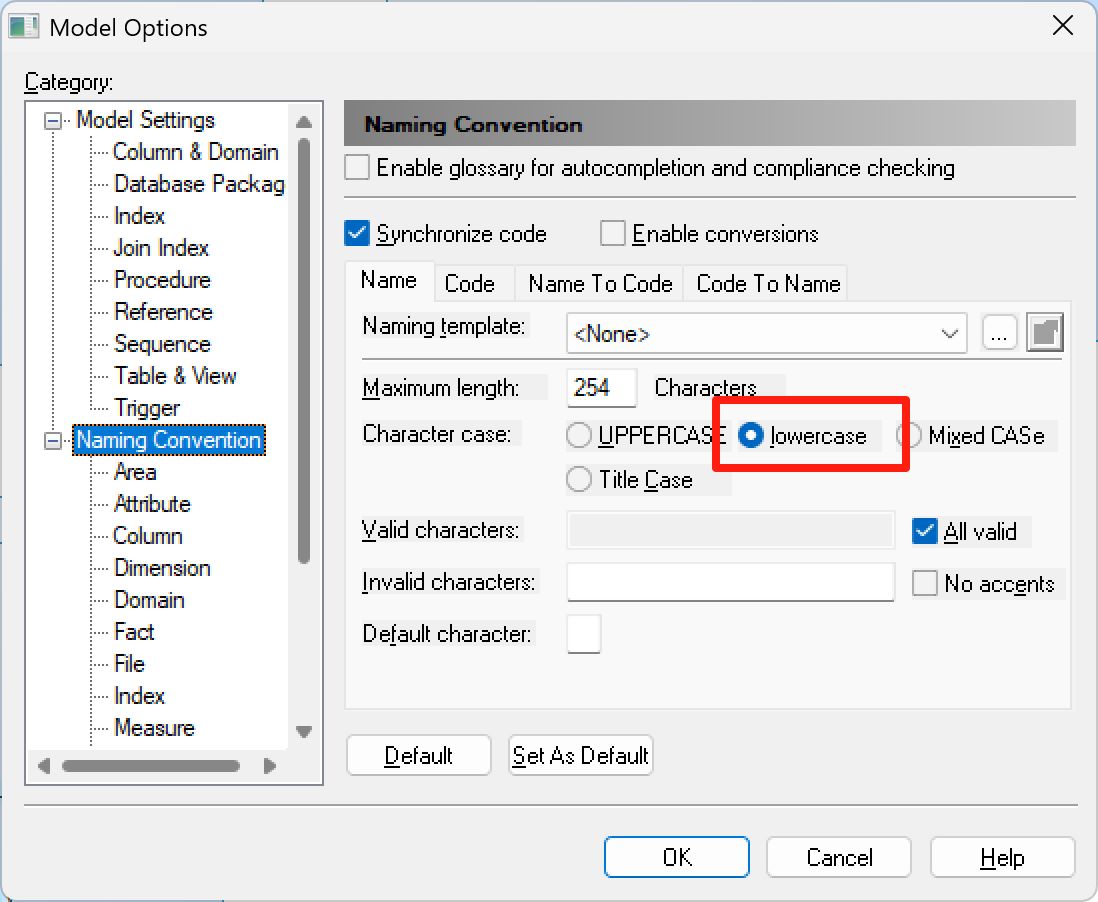
PowerDesigner->Tools->Execute Commands->Edit/Run Scripts
将代码Copy进去执行就可以了
Option Explicit
ValidationMode = True
InteractiveMode = im_Batch

Dim mdl   ' the current model

' get the current active model
Set mdl = ActiveModel
If (mdl Is Nothing) Then
  MsgBox "There is no current Model"
ElseIf Not mdl.IsKindOf(PdPDM.cls_Model) Then
  MsgBox "The current model is not a Physical Data model."
Else
  ProcessFolder mdl
End If

Private Sub ProcessFolder(folder)
  On Error Resume Next
  Dim Tab   ' running table
  For Each Tab In folder.tables
    If Not Tab.isShortcut Then
      ' 修改表名:code + 空格 + comment
      ' 如果comment为空,则只使用code
      If Tab.comment <> "" Then
        Tab.name = Tab.code & " " & Tab.comment
      Else
        Tab.name = Tab.code
      End If

      Dim col   ' running column
      For Each col In Tab.columns
        ' 修改列名:code + 空格 + comment
        If col.comment <> "" Then
          col.name = col.comment
        Else
          col.name = col.code
        End If
      Next
    End If
  Next

  Dim view   ' running view
  For Each view In folder.Views
    If Not view.isShortcut Then
      ' 修改视图名:code + 空格 + comment
      If view.comment <> "" Then
        view.name = view.code & " " & view.comment
      Else
        view.name = view.code
      End If
    End If
  Next

  ' go into the sub-packages
  Dim f   ' running folder
  For Each f In folder.Packages
    If Not f.IsShortcut Then
      ProcessFolder f
    End If
  Next
End SubOption Explicit
ValidationMode = True
InteractiveMode = im_Batch
Dim mdl ' the current model
' get the current active model
Set mdl = ActiveModel
If (mdl Is Nothing) Then
MsgBox "There is no current Model "
ElseIf Not mdl.IsKindOf(PdPDM.cls_Model) Then
MsgBox "The current model is not an Physical Data model. "
Else
ProcessFolder mdl
End If
' This routine copy name into comment for each table, each column and each view
' of the current folder
Private sub ProcessFolder(folder)
Dim Tab 'running table
for each Tab in folder.tables
if not tab.isShortcut then
tab.comment = tab.name
Dim col ' running column
for each col in tab.columns
col.comment= col.name
next
end if
next
Dim view 'running view
for each view in folder.Views
if not view.isShortcut then
view.comment = view.name
end if
next
' go into the sub-packages
Dim f ' running folder
For Each f In folder.Packages
if not f.IsShortcut then
ProcessFolder f
end if
Next
end subOption Explicit
ValidationMode = True
InteractiveMode = im_Batch
Dim mdl ' the current model
' get the current active model
Set mdl = ActiveModel
If (mdl Is Nothing) Then
MsgBox "There is no current Model"
ElseIf Not mdl.IsKindOf(PdPDM.cls_Model) Then
MsgBox "The current model is not an Physical Data model."
Else
ProcessFolder mdl
End If
Private Sub ProcessFolder(folder)
On Error Resume Next
Dim tab ' running table
For Each tab In folder.tables
If Not tab.isShortcut Then
' 将Code附加到Name前
tab.name = tab.code & " " & tab.name
End If
Next
' 递归处理子包
Dim f ' running folder
For Each f In folder.Packages
If Not f.IsShortcut Then
ProcessFolder f
End If
Next
End Sub
mkdir /data/zabbix -p
mkdir /data/mysql -p
echo "version: '3.8'
services:
  mysql:
    container_name: mysql
    image: mysql:8.0
    restart: unless-stopped
    environment:
      TZ: Asia/Shanghai
      MYSQL_DATABASE: zabbix
      MYSQL_USER: zabbix
      MYSQL_PASSWORD: zabbix_pwd
      MYSQL_ROOT_PASSWORD: 123456
    network_mode: "host"
    volumes:
      - ./data:/var/lib/mysql
      - ./logs:/var/log/mysql
      - ./conf.d:/etc/mysql/conf.d
      - ./my.cnf:/etc/my.cnf
    command: --character-set-server=utf8 --collation-server=utf8_bin --default-authentication-plugin=mysql_native_password">/data/mysql/docker-compose.yml

echo "[mysqld]
#绑定IP
bind-address = 0.0.0.0
# 设置3306端口
port=3306

#修改为北京时间
default-time-zone=+8:00

# 服务端使用的字符集默认为utf8mb4
character-set-server=utf8mb4
init_connect='SET NAMES utf8mb4'

# 创建新表时将使用的默认存储引擎
default-storage-engine=INNODB

# 默认使用“mysql_native_password”插件认证
#mysql_native_password
default_authentication_plugin=mysql_native_password

[mysql]
# 设置mysql客户端默认字符集
default-character-set=utf8mb4

[client]
# 设置mysql客户端连接服务端时默认使用的端口
port=3306
default-character-set=utf8mb4">/data/mysql/my.cnf

echo "docker-compose down && docker-compose up -d && docker logs -f mysql" >/data/mysql/restart.sh

echo "version: '3.5'
services:
  zabbix-server:
    image: zabbix/zabbix-server-mysql:latest
    container_name: zabbix-server
    environment:
      TZ: Asia/Shanghai
      DB_SERVER_HOST: 192.168.100.1
      MYSQL_USER: root
      MYSQL_PASSWORD: 123456
      MYSQL_DATABASE: zabbix
      StartConnectors: 3
      StartIPMIPollers: 1
      StartJavaPollers: 1
      StartSNMPTrapper: 1
      StartVMwareCollectors: 1
    ports:
      - "10051:10051"
    networks:
      - mynetwork
  zabbix-web:
    image: zabbix/zabbix-web-nginx-mysql:latest
    container_name: zabbix-web
    environment:
      TZ: Asia/Shanghai
      ZBX_SERVER_HOST: zabbix-server
      DB_SERVER_HOST: 192.168.100.1
      MYSQL_USER: root
      MYSQL_PASSWORD: 123456
      MYSQL_DATABASE: zabbix
    ports:
      - "8080:8080"
      - "8443:8443"
    networks:
      - mynetwork
networks:
  mynetwork:
    external: true
">/data/zabbix/docker-compose.yml#centos8
sudo rpm -Uvh https://repo.zabbix.com/zabbix/7.0/centos/8/x86_64/zabbix-agent-7.0.0-release1.el8.x86_64.rpm
#centos9
sudo rpm -Uvh https://repo.zabbix.com/zabbix/7.0/centos/9/x86_64/zabbix-agent-7.0.0-release1.el9.x86_64.rpm
sudo systemctl status zabbix-agent
#如果未安装成功
sudo dnf install zabbix-agent
#修改文件
sudo vi /etc/sysctl.conf
fs.inotify.max_queued_events=1048576
fs.inotify.max_user_instances=1048576
fs.inotify.max_user_watches=1048576
sudo sysctl -pvi /etc/zabbix/zabbix_agentd.conf
#或者
vi /etc/zabbix_agentd.conf
Server=192.168.232.170
StartAgents=3
ServerActive=192.168.232.170
Hostname=dev-test
sudo systemctl enable zabbix-agent
sudo systemctl start zabbix-agent && sudo systemctl status zabbix-agent && tail -f /var/log/zabbix/zabbix_agentd.log
#查看运行日志
tail -f /var/log/zabbix/zabbix_agentd.log